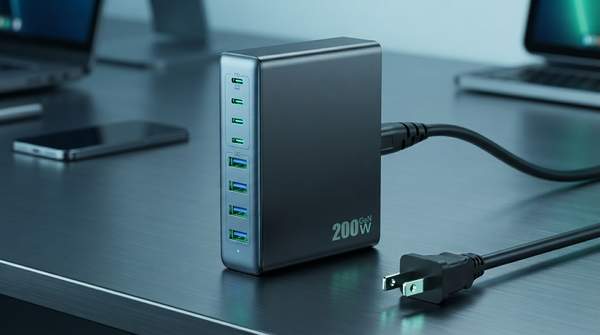
The single most important thing to understand about high-wattage USB-C chargers is that the number on the box is not the number your laptop receives. A "300W" station can still starve your primary device if its power distribution rules are poorly designed. This guide gives you a reusable framework for evaluating any 100W+ charging station across three dimensions—power delivery, port configuration, and thermal management—using the CUKTECH 30 Ultra as a worked example based on reviewer testing.
Introduction: Why High-Wattage USB-C Chargers Matter for Tech Professionals
If you carry a modern laptop, a tablet, a phone, and a set of accessories, you are no longer charging one device at a time—you are running a small power grid at your desk. A buying guide on Alibaba's electronics site observes that consumer expectations have shifted: buyers no longer accept "fast" as 18W per port, and instead expect full-speed delivery across every port simultaneously. That expectation, the guide argues, requires GaN and PD 3.1 architecture rather than marketing labels.
Tom's Hardware, whose charger testing emphasizes real-world performance over marketing claims, makes the stakes concrete: once you hit the 100W-plus range, heat and sustained output matter far more than they do at lower wattages. In other words, the failure modes of a cheap 20W brick and a 140W multi-port station are different in kind, not just degree.
Key Technologies: GaN, PD 3.1, and PPS Explained
Three technologies do most of the work in modern high-wattage chargers. Gallium nitride (GaN) is a semiconductor material that allows chargers to be smaller and more efficient than silicon-based designs, which matters both for travel and for heat dissipation during sustained high-power operation. Tom's Hardware credits modern technologies like USB-PD, PPS, QC, and GaN with significantly improving charging speeds, efficiency, and size.
Power Delivery 3.1 is the USB-C standard that enables ports to deliver well beyond the older PD 3.0 ceiling of 100W—enough for high-performance laptops. The Alibaba guide recommends that at least one port support PD 3.1 Extended Power Range at 140W or higher to future-proof for next-generation laptops, while noting PD 3.0 suffices for most current devices.
PPS (Programmable Power Supply) is the subtler of the three. As Matt Gregersen explained in his Gadgeteer review of the VOLTME 140W charger, PPS modifies current and voltage in real time according to a device's needs. That dynamic adjustment is what lets a single port negotiate efficiently with a phone, a tablet, or a laptop without wasting energy as heat.
Decision Framework for High-Wattage USB-C Chargers
Here is the framework. Start with your heaviest single load—typically a laptop—and work outward to your secondary devices. The goal is to identify which features are non-negotiable for your specific device mix and which are merely nice to have.
| Criterion | What to check | Why it matters |
|---|---|---|
| 1. Primary device demand | Does at least one USB-C port deliver your laptop's full rated wattage (e.g., 140W) via PD 3.1 EPR? | A charger that cannot service your highest-draw device at full speed fails its core job, whatever the total wattage claims. |
| 2. Port mix | Count USB-C vs. USB-A vs. other ports; match to your actual accessories. | High-wattage USB-C ports should be reserved for primary devices; USB-A handles headphones and legacy gear. |
| 3. Power distribution under load | Read the manufacturer's distribution chart for simultaneous-charging scenarios. | Total wattage is split dynamically across active ports; per-port output can drop when multiple devices connect. |
| 4. Thermal design | Look for GaN construction and any independent confirmation of sustained output. | A "100W" label means little if sustained output drops after minutes of load; heat governs real performance. |
The Alibaba guide puts the discipline this way:
Don't scan for "5 ports." Scan for how those ports behave under real load.
Apply the matrix in order. If a charger fails criterion one, stop. If it passes, criteria two and three determine whether it fits your ecosystem, and criterion four determines whether it will still perform that way an hour into a heavy session.
Understanding Power Distribution in Multi-Port Chargers
Power distribution is where most buying mistakes happen. A charger's total wattage is dynamically allocated among active ports, which means the output of any single port can decrease the moment you plug in a second device. Gregersen's VOLTME testing illustrates the pattern: the charger delivers up to 140W to a single device, or distributes that full amount across multiple devices—he measured 65W, 45W, and 22W across an older MacBook Pro, a Samsung tablet, and a gaming laptop connected simultaneously.
That 65/45/22 split is exactly the kind of number a distribution chart should reveal before purchase. If your laptop needs 100W sustained and the chart shows it dropping to 65W when a tablet joins, you have your answer—regardless of the headline wattage. The Alibaba guide's advice to check for independent lab test citations confirming thermal stability is the practical safeguard when a manufacturer's chart is vague.
Case Study: The CUKTECH 30 Ultra as a Worked Example
Philipp Briel's hands-on review of the CUKTECH 30 Ultra at Basic Tutorials shows what passing the framework looks like. The station offers 300W of total power with two USB-C ports each capable of up to 140W via PD 3.1, plus a third USB-C port delivering 33–44W and a USB-A port for accessories.
Run it through the matrix. Criterion one: the 140W ports clear the bar for high-power laptops. Criterion two: Briel used the port mix exactly as the framework prescribes—two USB-C ports simultaneously for a MacBook Air and a tablet, the lower-wattage third USB-C port for smaller devices, and USB-A for headphones and older accessories. Criterion three: he reported that both fast ports charged "noticeably quickly, without the performance of the two ports slowing each other down," and that his phone charged at full fast-charging speed whether it negotiated PD, PPS, or Quick Charge. Criterion four: he charged four to five devices at once "without the station showing any noticeable signs of reaching its limits."
One caveat belongs here: these are reviewer observations and manufacturer specifications, not independent laboratory measurements. Briel's testing is hands-on and specific, but the framework's thermal criterion is best satisfied by both reviewer reports and independent test data when available.
Making Your Choice: A Practical Conclusion
The decision: tech professionals should select a high-wattage USB-C charger by prioritizing its ability to meet the peak power demands of their primary device, ensuring flexible port configurations for their full device ecosystem, and verifying support for advanced power delivery standards like PD 3.1 and PPS, while also considering thermal management.
The measurable indicator to hold any candidate against is the ability of the chosen charger to simultaneously fast-charge all essential devices without thermal throttling or significant performance degradation. Before buying, find the manufacturer's power distribution chart, confirm your laptop's port can draw its full rated wattage while your second-highest device is also connected, and look for reviewer or independent test evidence of sustained output. If a charger cannot document that scenario, its headline wattage is a marketing number, not a specification.
Sources
- 5-Port USB Charger Guide: How to Choose Wisely in 2026 — Electronics
- Best USB Chargers 2026: Our tested phone and laptop charger picks, from compact GaN to budget charging bliss — Tom's Hardware
- VOLTME 140W USB C charger review - One charger for all - The Gadgeteer
- CUKTECH 30 Ultra Review: 300-Watt Charging Station for Gaming Laptops, Laptops, and Smartphones — Basic Tutorials